Collapssi software · Personal assistant

Tina

Tina is the Turkish-speaking personal AI assistant we built for our own work. Saying "remind me to call the accountant tomorrow at 10" is enough: Tina understands the date, sets the reminder and sounds an alarm when the time comes. Notes, tasks, the calendar, projects, contacts, meeting transcripts, documents, invoices, passwords and monitored websites all live in one app. Data stays on your own computer or in a cloud workspace reserved for you; everything the assistant does is logged and can be undone. It runs as a desktop app on Windows, as an Android app, through a Siri shortcut on iPhone and in the browser. Every feature grew out of a real need; below we describe them one by one. Next step: international sales by subscription, with packages for different professions.
  • Python and FastAPI
  • SQLAlchemy and SQLite
  • React and TypeScript
  • Tauri 2 (Windows)
  • Android (Java)
  • Claude API
  • Local speech recognition with Whisper
  • Windows OCR and Tesseract
  • Local multilingual semantic search
  • Docker and Railway
  • MCP and webhooks
  • AES-256 encryption
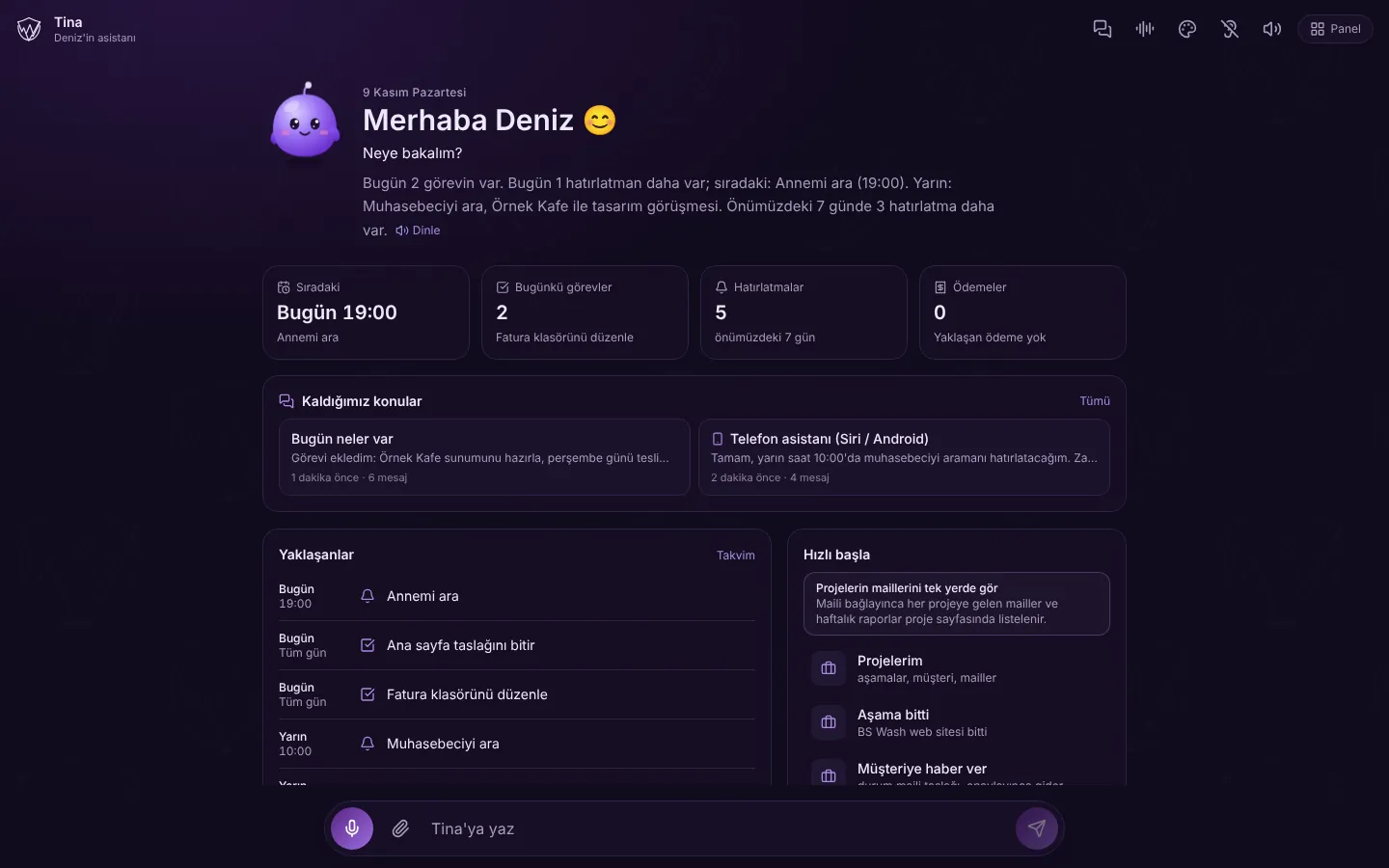
Tina home screen: daily summary, tasks and reminders
Language
Turkish, in natural conversation
Runs on
Windows, browser, cloud, Android and iPhone
Data
On your computer or in your own cloud space, with encrypted backups
Safety
Every action logged; critical steps need approval, writes are reversible
Profession packages
Agency, law, accounting, clinic, real estate, shop and general
Roadmap
International sales by subscription (next step)

The screenshots were taken from a local copy of Tina with fictional sample data (names such as Deniz, Örnek Kafe and Ayşe Örnek are examples). The reply texts in the chat screen were written as examples; the reminder and task cards were created by the app itself. Features in sections without images also work in the app.

01

Talking to Tina

On the home screen Tina greets you, sums up the day and shows what is next. You type or say what you need; Tina understands the request, creates the right record herself and remembers what she learns.

  • Daily summary: today's tasks, the next reminder, tomorrow's plans; read aloud with "Listen"
  • Summary cards for the next item, today's tasks, reminders and payments
  • Reminders, tasks and notes from requests such as "remind me tomorrow at 10" or "add a task due Thursday"
  • Every record appears as a card in the chat and can be cancelled with a single "Undo"
  • Turkish time parser: understands relative dates such as "Tuesday next week", day names, repeats such as "the 1st of every month" and past expressions such as "yesterday" or "last Tuesday"
  • Chat boxes by topic: titles are given automatically, boxes can be searched and renamed; "Where we left off" picks up the conversation
  • Choose the assistant's personality: friendly, professional, playful, short and to the point, or motivational coach; a personal style note such as "call me boss" can be added
  • Rule-based command mode when no AI is connected: asks "when?" or "with whom?" if something is missing, sets up meetings, finds numbers and notes, answers "help" and "what time is it"
  • Inbox: text that was not understood is never lost and can be turned into a note, task or reminder with one click
  • Tina's tips: she asks "have you tried this?" about new features; Yes, Later or No thanks
  • Long-term memory: Tina saves what she learns about the user from chats, never stores the same fact twice, refuses sensitive data such as passwords, cards and IBANs; every fact can be edited or deleted on the Memory screen
  • Semantic search: finds notes, documents and meetings that are close in meaning even without the exact word; runs on a multilingual model on Tina's own machine and is combined with keyword search
  • Long chat memory: longest, long or short, depending on the model in use
  • Tina mascot and glowing orb: glows while listening, pulses while thinking; purple brand identity and logo
Tina home screen
Tina home screen
Chatting with Tina: reminder and task cards
02

Dashboard, tasks, calendar and projects

The light-themed dashboard shows all of the day's work together. The calendar brings reminders, tasks, meetings, invoice payments and important document dates into the same month. The Projects screen gathers everything about one job on a single page.

  • Daily summary, command box for the assistant and buttons for a new note, reminder, task, document upload and backup
  • Next 7 days, today's tasks and pending reminders; priority labels
  • Notes with project, category, tags, pinning and a recycle bin
  • Repeating and snoozing reminders: 10 minutes, 1 hour, this evening, tomorrow morning or any time in plain language; a Snoozed tab and a missed list
  • Unified calendar: reminders, tasks, meetings, invoice payments and document dates in the same month
  • Projects screen: the project's notes, tasks, documents, meetings, contacts and the dates of the next 90 days on one page
  • Client projects: stages are defined; when a stage is finished Tina drafts a status e-mail for the client, which is sent once approved; e-mails about the project are listed on its page
  • Debts and receivables: payments without an invoice are tracked too and reminded on the morning of the due date
  • Activity log: a history of everything Tina and the user have done
Dashboard
Dashboard
Calendar
Calendar
03

Contacts and meetings

Tina also works as a business notebook: people and companies, meetings, decisions and what was said in a meeting are stored and linked to projects.

  • Contact and company directory; Tina understands names with titles such as "Ahmet Bey" and asks which one you mean if several people share a name
  • Import contacts from Google Contacts, the phone's address book (only the ones you pick), .vcf files and e-mail correspondence; no duplicates
  • Meeting record: date, place, company, participants, notes, decisions and the next meeting
  • Action items written in a meeting become tasks directly
  • With the "transcribe the meeting" command, what is said is written down live on the phone; who said what and when is kept line by line
  • Transcription does not start until participants' consent is ticked; audio is never stored, only the text remains
  • "Introduce my voice": the user reads three short sentences and Tina measures the recording quality; in the transcript the user's words appear as "Me" and others as "Speaker 2, Speaker 3", separated by voice
  • Voice separation happens on Tina's own server or on the computer and is not sent to any third-party service
  • WhatsApp message drafts for a contact; sending stays with the user
Meeting record: decisions and action items
04

Documents, invoices, expenses and banking

Documents, invoices and spending live together in Tina. When an invoice is uploaded, the seller, amount and date are read; expenses are categorised and bank transactions are matched with invoices.

  • Document upload; reading Turkish e-invoice and e-archive XML files (UBL-TR) and extracting PDF text
  • Local reading rules for Turkish invoices; AI review if permitted; reminder suggestions for important dates in a document
  • Text recognition in scanned documents: Windows' built-in OCR, Tesseract in the cloud
  • Document scanning with the phone: edges are found automatically, corners can be dragged to adjust; colour, grey or black and white
  • Front and back of an ID card or driving licence placed at real size on a single A4 PDF, printing like a photocopy; ID documents are never sent to AI
  • Invoices from e-mail: the mailbox is scanned read-only (no e-mail is deleted, moved or marked as read); e-mails with invoice attachments are found every 15 minutes and added to Invoices
  • Expense categorisation with rules that learn per seller, and a monthly expense summary
  • Importing bank statements (CSV or Excel), categorising transactions and suggesting invoice matches
05

On the phone and by voice

Tina is not only on the computer but on the phone too. The Android app can be set as the phone's assistant; on iPhone she works with Siri; the phone view is arranged for small screens.

  • Default digital assistant on Android: hold the power button and Tina listens; replies are read in the phone's Turkish voice; app shortcuts
  • "Hey Siri, Tina" shortcut on iPhone, set up with a single tap
  • "Send to Tina" from the Share menu: a photo, file or text goes straight to Tina; documents such as invoices or appointments are reviewed right away
  • Listens when you say "Tina" while the screen is on; can start listening automatically when the app opens
  • Tina's voice: a natural female voice (ElevenLabs or Google); otherwise the device voice; long replies are read sentence by sentence
  • Local speech recognition on the computer (Whisper) and a global shortcut that opens Tina from anywhere (Ctrl+Shift+Space)
  • Full-screen reminder alarm with sound and vibration; push notifications when the app is closed, with "Done" or "Snooze 10 min" on the notification
  • My Places: tracks time spent at saved places such as the office or the gym without keeping a location history; a background service on Android, arrival and departure automations on iPhone
  • Setup guide, all permissions with one tap and an "Install on phone" screen
  • Notes, reminders, tasks and search work even without an AI key
Tina, phone view
Tina, phone view
06

My Computer: using the computer from the phone

The computer can be controlled from the phone or from Siri. A small connector program is installed on the computer; it connects to Tina by itself, so no port is opened to the outside. Commands come from a fixed list; arbitrary commands are never run.

  • Works on Windows and Mac; set up with a one-time code, no administrator rights needed, starts automatically with the computer
  • Open programs, websites, folders and files; the connector finds the installed programs by itself
  • Lock, sleep, restart and shut down (with a 1-minute delay that can be cancelled); volume control
  • Take a screenshot and send it to the phone; find a file and send it to the phone; the computer shows a notification when this happens
  • Desktop shortcuts: files, folders, programs and links on an allow list can be opened; executable files are blocked
  • The desktop app runs in the system tray, starts with Windows and installs with a setup file
07

My Systems: monitoring websites and services

The websites we build and the services we use are followed from Tina. When a site goes down, slows down or receives a new order, a notification arrives on the phone; a short report arrives every day at a chosen time.

  • Supported systems: websites, WordPress, WooCommerce stores, sites with their own API, Google Analytics, Search Console, Railway and GitHub
  • Each connection is tested when added; keys are kept in an encrypted store and Tina is only told which fields are filled in
  • Is the site up: checked every 1, 5, 15 or 60 minutes; "down" after two failures in a row, "back up, it was down for X minutes" when it recovers; slowness warnings
  • New events: WooCommerce orders and members, pending WordPress comments and members, failed GitHub jobs, crashed Railway services
  • Instant notification address: the website tells Tina itself about a new form, order or member
  • Daily and weekly report: uptime and speed, orders and revenue, best sellers, visitors, Google impressions and clicks
  • A visitor card showing how many people are on the site right now
  • You can ask Tina ("are the sites up?", "how many orders came in today?"); anything that changes a site (order status, draft post, redeploy) always requires approval
08

Automation and integrations

Tina takes care of recurring work and talks to the other tools in use.

  • Automation rules: when a time or an event comes, create a task, reminder, note, notification or webhook
  • Web monitoring: a notification when a page changes or a phrase appears on it
  • MCP server: AI apps such as Claude Desktop can connect to Tina with permission
  • Signed outgoing and key-protected incoming webhooks for n8n, Zapier and Make; undelivered notifications wait in a persistent queue and are retried
  • Google Calendar sync; a meeting is added to the calendar only after approval and no invitations are sent
  • Subscription link for the phone's calendar (iPhone or Google Calendar)
  • Google Drive file search: name and date only, file contents are not downloaded
  • Web research: answers with sources; off by default
09

Sensitive information, backups and privacy

Even the most sensitive information can be entrusted to Tina: passwords and personal details are stored encrypted and never sent to AI. What the assistant may do is limited by risk level.

  • Vault: account passwords are stored with AES-256 encryption and never sent to AI; sentences like "my password is ..., save it" are caught before reaching the chat and moved into the Vault form
  • In the cloud, the login password is asked again to view a password; a revealed password is hidden after 30 seconds; who looked and when is logged
  • Import passwords from a Google or Apple password manager export file
  • My Details: personal and company information; sensitive fields such as the national ID number, IBAN and address are encrypted and never go to AI
  • Encrypted full backup (.tinayedek): everything in one file protected by the user's backup password; a local backup every day, optionally once a week to the user's own e-mail address; restore from file
  • Backups to a local folder and to a Google Drive folder
  • Local-only mode (desktop): no connection leaves the computer at all; a stronger model can be chosen instead
  • Tools by risk level: reading is automatic, writing is reversible, critical actions always need approval
  • In a turn where a document, web page or e-mail was read, writes require approval; hidden instructions inside them cannot steer Tina
  • Login tracking and My Devices: device name, approximate city and remote sign-out
  • Phone pairing code, phone keys limited to specific tasks, a failed-attempt limit and protection against forged requests (CSRF)
10

Cloud, administration and profession packages

Tina also runs in the cloud with nothing to install. Each customer's data lives in a physically separate workspace; the admin screen shows every Tina in one place. Profession packages arrange Tina for a lawyer, an accountant or a shop.

  • Sign-in with username and password; each customer gets a separate workspace with its own folder and database
  • Packaged with Docker and live on Railway; data is kept on a persistent disk
  • Admin screen: every Tina and user, invitations, temporary passwords, closing accounts, last logins and persistent disk status
  • The administrator cannot enter another Tina's data; membership only through an explicit invitation
  • Profession packages: agency, law firm, accounting, clinic, real estate, shop and general business; the administrator assigns the package
  • The dashboard menu, "quick start" shortcuts, Tina's tips and wording follow the package (for example "Add hearing" and "Deadline reminder" in the law package, "Record credit sale" in the shop package)
  • Friend Tina: two Tinas send each other approved notes, tasks or reminders, which land in the other side's inbox
  • Windows desktop app (Tauri), browser and phone views; light and dark themes, 6 app colours
11

What we built specifically for this business

Tina was built for Collapssi's own work and grew step by step from Mustafa Cinali's requests. Every feature came from a need, and the request, the decision and the reasoning were recorded together. We did not adapt an off-the-shelf app; everything was written for this use.

  • Meeting transcripts, invoices from e-mail, the password vault, My Places (which works out time spent at the gym), ID and licence scanning and controlling the computer from the phone were each added at the user's request
  • The agency package follows Collapssi's way of working: client projects with stages, "Stage finished" and "Notify the client" shortcuts, project e-mails found by keywords
  • A rule-based command mode and inbox were built so Tina keeps working without an AI connection
  • My Systems was built to monitor the sites Collapssi develops (their own APIs, WooCommerce, Google, Railway, GitHub) in one place
  • Tina knows her owner by name: the header reads "...'s assistant"; separating speakers by voice happens on our own server and audio never goes to a third party
  • A natural female voice was added at the request that "it should not sound like AI"
  • To make controlling the computer easy to set up, Tina finds the programs herself; the user only confirms the operating system's prompt
  • Made for Turkey: reading Turkish e-invoices and e-archive invoices, Turkish invoice rules, Turkish bank statement columns, mandatory consent for meeting transcripts under Article 133 of the Turkish Penal Code, and ID documents kept away from AI under the KVKK data protection law
12

Next steps

The items below are not finished yet; they are planned work in progress.

  • Sales infrastructure: payments, a trial period, a product page and legal texts, so Tina can be sold internationally by subscription with profession packages
  • A deeper law package: clients, case files, hearing and deadline tracking (the menu and shortcut layout of profession packages already works today)
  • Live bank connection: a provider-independent layer and a test bank are ready; real banks are waiting for a contract with a licensed intermediary service. Payment orders are always approved by the user at the bank; Tina never sends money

Planning a similar project?

Tell us what you need; we will define the scope, timeline and cost together. The first consultation is free.

Tell us about your project